Showing posts with label Web Proxy Checker. Show all posts

Web Proxy Checker Pro 1.7.27


Download Web Proxy Checker Pro Now

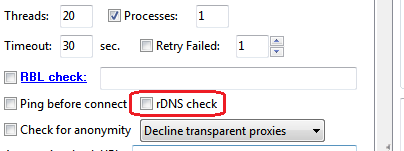
[+] New version of Web Proxy Checker Pro allows to check IPs and IP ranges against RBL (DNSBL) lists. Additionaly you can perform rDNS (Reverse DNS) check of your list of IPs and IP ranges.

To check IP ranges with Web Proxy Checker Pro:

  • Enter IPs or IP ranges in "Proxies/Files/URLs". Also you can enter path to the file with IPs or URL here. Format of IP ranges is: ip1-ip2.
  • Select Load and combine mode.
  • Turn on "Check IPs" option.
  • Select "RBL check" option and list of RBLs to check.

Web Proxy Checker Pro 1.7.25

Download Web Proxy Checker Pro Now

[+] New version of Web Proxy Checker Pro is able to filter out bad SMTP greetings, that don't contain expected values. That may be useful to detect honeypots. For example, greeting for smtp.live.com should contain "Microsoft" substring. To remove bad (honeypot?) proxies enter string "Microsoft" into "Proxy check fails if response does not contain" option.


Web Proxy Checker Pro 1.7.23

Download Web Proxy Checker Pro Now

[+] Min. proxies. Minimum amount of proxies to start checking.

GeoIP Database

Web Proxy Checker Pro allows to detect countries of proxies - on Advanced tab check "Detect proxy country" and enter the path to "IP2Country database" (http://www.optinsoft.com/wpcp-view.php?tab=2).

Format of IP2Country database is:
ip1,ip2,country_code
where ip1 and ip2 are numbers, country_code is 2-character country code.

You can download IP2Country database from www.maxmind.com (GeoLite Country CSV Format). To convert the maxmind csv file to the proper format, described above, you can use RegExp Extractor (see screenshot below).

Web Proxy Checker Pro 1.7.22

Download Web Proxy Checker Pro Now

[+] RBL Check option: Min. RBL positives. Proxy is blacklisted if number of RBL positives equal or exceed this value.

BTW, list of RBL services:

cbl.abuseat.org, dnsbl.invaluement.com, dnsbl.sorbs.net, dul.dnsbl.sorbs.net, smtp.dnsbl.sorbs.net, spam.dnsbl.sorbs.net, zombie.dnsbl.sorbs.net, dnsbl-2.uceprotect.net, pbl.spamhaus.org, xbl.spamhaus.org, bl.spamcannibal.org, ubl.unsubscore.com, combined.njabl.org, dnsbl.ahbl.org, dyna.spamrats.com, spam.spamrats.com, cdl.anti-spam.org.cn, drone.abuse.ch, dul.ru, short.rbl.jp, spamrbl.imp.ch, virbl.bit.nl, dsn.rfc-ignorant.org, spamguard.leadmon.net, netblock.pedantic.org, grey.uribl.com, ix.dnsbl.manitu.net, rbl.efnetrbl.org, blackholes.mail-abuse.org, dnsbl.dronebl.org, db.wpbl.info, query.senderbase.org, bl.spamcop.net, b.barracudacentral.org, ddnsbl.internetdefensesystems.com, http.dnsbl.sorbs.net, misc.dnsbl.sorbs.net, socks.dnsbl.sorbs.net, web.dnsbl.sorbs.net, dnsbl-1.uceprotect.net, dnsbl-3.uceprotect.net, sbl.spamhaus.org, zen.spamhaus.org, psbl.surriel.com, dnsbl.njabl.org, rbl.spamlab.com, ircbl.ahbl.org, noptr.spamrats.com, cbl.anti-spam.org.cn, dnsbl.inps.de, httpbl.abuse.ch, korea.services.net, virus.rbl.jp, wormrbl.imp.ch, rbl.suresupport.com, ips.backscatterer.org, opm.tornevall.org, black.uribl.com, multi.surbl.org, tor.dan.me.uk, relays.mail-abuse.org, rbl-plus.mail-abuse.org, access.redhawk.org, rbl.interserver.net, bogons.cymru.com


Web Proxy Checker Pro Update

Web Proxy Checker Pro stability release now available:

"wpchost.exe has stopped working"

When you run Web Proxy Checker Pro under non-administrative account you may get the error "wpchost.exe has stopped working" (see screenshot below).


That happens because Web Proxy Checker Pro process (wpcp.exe) does not have rights to launch the host process (wpchost.exe).

To avoid this problem you need to change Privilege Level for wpcp.exe - see the screenshot below.

Web Proxy Checker Update

Web Proxy Checker and Web Proxy Checker Pro stability release now available:


Howto: run several instances of proxy checker

This trick is about running several instances of proxy checker from different locations (folders).

To run 2 instances of Web Proxy Checker you need to create 2 folders for each instance (for ex. C:\WPC1 and C:\WPC2) and copy to these folders 4 files from C:\Program Files\Opt-In Software (I assume that proxy checker was installed to this folder):

wpcp.exe
WPCHost.exe
libeay32.dll
ssleay32.dll

Now you can run 2 instances of proxy checker (wpcp.exe) - first instance from folder C:\WPC1, second instance from folder C:\WPC2.

The problem here is that by default Web Proxy Checker stores application settings to user's Application Data folder. That means that all instances of program will share their settings. To avoid this problem you can use command line argument -appsettingsdir to specify where to save application settings.

To run first instance use this command:

C:\WPC1\wpcp.exe -appsettingsdir

To run second instance use this command:

C:\WPC2\wpcp.exe -appsettingsdir

The same trick works for other Opt-In Software applications: Web Searcher, Web URL Shortener, etc.

Web Proxy Checker Pro 1.7.18

Download Web Proxy Checker Pro Now

[+] Extract proxies from web pages using PERL-compatible regular expression (regexp). The regular expression must be enclosed by slashes (/). The first group in the regular expression matches the IP, the second group matches the Port (regexp groups are enclosed by parentheses).

Example of regular expression to find proxies:

/(\d{1,3}\.\d{1,3}\.\d{1,3}\.\d{1,3}):(\d{1,5})/

In this example (\d{1,3}\.\d{1,3}\.\d{1,3}\.\d{1,3}) matches the IP, (\d{1,5}) matches the Port.

Web Proxy Checker 1.5.17

Download Web Proxy Checker Now

[+] Program settings files moved to user's Application Data folder
[+] Improvements in logging.

Web Proxy Checker Pro 1.7.14

Download Web Proxy Checker Now

[+] Added support of STARTTLS command in "Check for SMTP" mode.


SMTP Commands example:

EHLO [%PROXY_HOST%]
STARTTLS
AUTH LOGIN
%BASE64_BEGIN%%FROM_EMAIL%%BASE64_END%
%BASE64_BEGIN%%FROM_PASS%%BASE64_END%
MAIL FROM:<%FROM_EMAIL%>
RCPT TO:<%TO_EMAIL%>
DATA
MIME-Version: 1.0
Date: %EMAIL_DATE%
X-Priority: 3 (Normal)
To: %TO_EMAIL%
From: %FROM_EMAIL%
Subject: %SUBJECT%
Content-Type: text/plain
Content-Transfer-Encoding:quoted-printable
Message-ID: <%RN10%.%DATETIME%@hotmail.com>

%BODY%

.
RSET
QUIT

Macroses, used in SMTP Commands:

%PROXY_HOST% - host part of the proxy.
%BASE64_BEGIN% ... %BASE64_END% - the start and the end of the BASE64-encoded block.
%FROM_EMAIL%, %FROM_PASS% - email and password of of the sender ("Check for Delivery"->"FROM Emails").
%TO_EMAIL% - target email ("Check for Delivery"->"TO Emails").
%EMAIL_DATE% - current date in email format.
%SUBJECT% - test subject ("Check for Delivery"->"Test Subjects").
%BODY% - test body ("Check for Delivery"->"Test Bodies").


Web Proxy Checker Pro 1.7.13

Download Web Proxy Checker Now

[+] rDNS Check added.


How "rDNS check" works

1. Web Proxy Checker determines the domain names associated with a given IP address (rDNS lookup).

2. Web Proxy Checker determines the list of IP addresses that are associated with domain names, resolved in step 1. rDNS check succeeded if source IP address is present in that list.

Web Proxy Checker 1.5.16

Web Proxy Checker Pro 1.7.12 also released.

Download Web Proxy Checker Now

This release includes performance and stability improvements. It does not have any new features.

Web Proxy Checker Pro 1.7.11 released.

Download Web Proxy Checker Now

[+] New RBL Check options (see screenshot below):

1. "Save proxies listed in RBL" allows to save blacklisted proxies to the file.

2. "Check RBL'd proxies". By default WPC checks a proxy for listings in RBLs before checking for connect. And if the proxy is blacklisted, WPC does not perform the connect test. When the option "Check RBL'd proxies" is turned on, WPC continues checking the blacklisted proxy.

Web Proxy Checker 1.5.15 released

Web Proxy Checker Pro 1.7.9 also released.

Download Web Proxy Checker Now

[+] Interface changes.
[+] Check for HTTP POST (in Free and Pro versions).


[+] Scan ranges of IP addresses for open HTTPS and SOCKS ports (in Pro version only).

Examples of correct IP ranges:

127.0.0.1-127.0.0.255
127.0.0.1-127.0.0.255:1080
#127.0.0.1-127.0.0.255:3128

'#' in the last example means "HTTPS proxy" ('+' - SOCKS4, '*' - SOCKS5).
If port is specified then scan ports settings will be ignored.


Web Proxy Checker 1.5.14 released

Web Proxy Checker Pro 1.7.7 also released.

Download Web Proxy Checker Now

[+] Now you can type proxies directly into the source list, without need of making the source file.
[+] If one of the source files or urls is unavailable, Proxy Checker will not stop and continue checking available proxies.

Web Proxy Checker Pro 1.7.6 released

Download Web Proxy Checker Now

In new version: interface changes and minor bugfixes.


Web Proxy Checker 1.5.13 released

Download Web Proxy Checker Now

In new version: interface changes and minor bugfixes.


Web Proxy Checker Pro 1.7.5 released

Download Web Proxy Checker Now

Improvements/Bugfixes

[+] Check for anonymity - detect anonymous and high anonymous (elite) proxies.


By the degree of anonymity HTTP proxies can be Transparent, Anonymous and High Anonymous (Elite). You can read more about proxies and their anonymity here: Proxy Lists

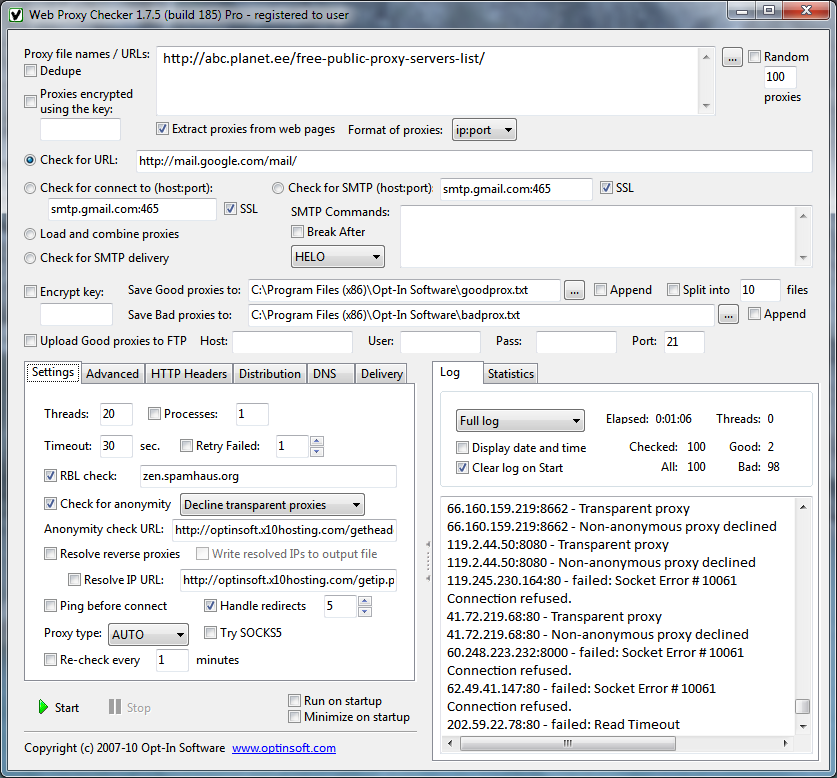
Web Proxy Checker Pro allows you to detect anonymous proxies. Turn on "Check for anonymity" option and select required level: "decline transparent proxies" or "only elite proxies allowed". "Anonymity check URL" - url of the script that returns HTTP request headers. By default proxy checker uses this url: http://optinsoft.x10hosting.com/getheaders.php. But you can use your own script located on your hosting.

PHP script example that returns HTTP request headers

<?php
$headers = array();
echo "REMOTE_ADDR: ".$_SERVER['REMOTE_ADDR']."<br />\n";
foreach(array_keys($_SERVER) as $skey)
{
  if(substr($skey, 0, 5) == "HTTP_")
  {
    if ($skey != "HTTP_COOKIE")
    {
      echo $skey.": ".$_SERVER[$skey]."<br />\n";
    }
  }
 }
?>