Download Web URL Shortener Now
[+] Added brief.ly shortening service. This service produces several short urls:
http://brief.ly/
http://links2.me/
http://many.at/
http://name.ly/
http://ofcour.se/
http://sincere.ly/
http://thatis.me/
http://whatel.se/
http://whereel.se/
http://whoel.se/
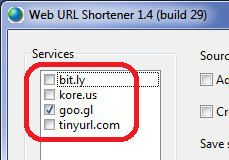
1. Removed kore.us shortening service.
2. Added snurl.com shortening service.
Download Web URL Shortener Now
[+] Added new URL shortening service: http://tinyurl.com/
This trick is about running several instances of proxy checker from different locations (folders).
To run 2 instances of
Web Proxy Checker you need to create 2 folders for each instance (for ex. C:\WPC1 and C:\WPC2) and copy to these folders 4 files from C:\Program Files\Opt-In Software (I assume that proxy checker was installed to this folder):
wpcp.exe
WPCHost.exe
libeay32.dll
ssleay32.dll
Now you can run 2 instances of proxy checker (wpcp.exe) - first instance from folder C:\WPC1, second instance from folder C:\WPC2.
The problem here is that by default
Web Proxy Checker stores application settings to user's Application Data folder. That means that all instances of program will share their settings. To avoid this problem you can use command line argument
-appsettingsdir to specify where to save application settings.
To run first instance use this command:
C:\WPC1\wpcp.exe -appsettingsdir
To run second instance use this command:
C:\WPC2\wpcp.exe -appsettingsdir
The same trick works for other Opt-In Software applications:
Web Searcher, Web URL Shortener, etc.
Download Web URL Shortener Now
[+] Added new URL shortening service: http://kore.us/
Download Web URL Shortener Now
Web URL Shortener is a tool that allows to create short URLs for your list of links that can be easily shared, tweeted, or emailed to friends.
First version supports only bit.ly shortener service. I'm planning to add several other services in the future versions of this program.